The Journal · WTM Studio
Website, web app,
or mobile app?
If customers mainly need to understand your services, book, or send an inquiry, start with a website. Consider a web app for repeat tasks in a browser. Consider a mobile app when frequent use or device features justify an installation. Choose around the task customers need to finish.
Compare the decisions.
| Decision | Website | Web app | Mobile app |
|---|---|---|---|
| Primary job | Help someone discover, understand, and choose the business. | Help someone complete a workflow through a browser. | Support a recurring task on a phone or other target device. |
| Entry point | A link, search result, or shared page. | A link or returning visit, often with an account. | Installation and a reason to return; distribution depends on the platform. |
| Scope to compare | Page types, content, customer journey, and connected tools. | Workflows, roles, data, integrations, and browser testing. | Workflows, data, device capabilities, platforms, and release requirements. |
| Ongoing work | Content, platform or hosting, and integration maintenance. | Those responsibilities plus the application’s data and operating workflows. | Application operations plus supported device and platform changes. |
Do I need an app if customers mainly book or send inquiries?
Usually, start with a website. Customers should be able to understand the service and book or inquire without installing anything. If they also need an account to manage ongoing work, compare a web app. Consider a mobile app when frequent return visits or specific device features make it useful.
Then identify the starting point. Is the person arriving from a search result with no knowledge of the business? Are they already a customer opening the product each morning? A first visit needs context and trust. A repeated visit needs continuity and a short route to the task.
Our recommendation is to decide around that journey. Avoid turning the conversation into a contest between technologies before the product has a clear purpose. A polished interface should make the chosen job easier to complete.
When is a website the right starting point?
A website is a useful starting point when people need to discover your business, compare your services, see relevant work, and contact you. It can also include interactive journeys. A booking experience does not become a separate mobile app simply because it has availability or a form.
Naples Coastal Vacations is a concrete example from WTM’s work. Its website connects the feeling of a destination with finding a place to stay. The product decision is about helping a visitor move from interest to a direct-booking experience. Explore the website and our website design service.
For an established business, a redesign may be more useful than a new product. If customers cannot read the service pages comfortably on a phone or find the contact details, start by improving that journey. Our website redesign service addresses the existing site and its transition.
When does a web app make sense?
Consider a web app when the central experience is doing a task through a browser. Think of it as a product with workflows, rather than only a set of pages introducing a business. Accounts, saved work, different user roles, or repeated actions can make that distinction useful during planning.
The label is less important than the requirements. Describe what a new user sees, what changes after they sign in, and what they should find when they return. If two people have different permissions, explain that difference before drawing their screens.
A progressive web app is one possible approach. It is built with web technologies and can offer capabilities such as installation and offline experiences where implemented and supported. It is not automatically equivalent to a platform-specific app. MDN explains the distinction and browser limitations. Required device features should be checked on the intended devices before selecting an approach.
When is a mobile app worth considering?
A mobile app deserves consideration when the product has a recurring role on someone’s phone. Begin with the reason to return. The home screen should make that purpose clear, and each supporting screen should help complete it.
Crockett, an app coming to the App Store and featured in WTM’s selected work, brings conditions, maps, and state license guidance into a connected experience. Those needs give the interface a specific structure. The conditions screen and the map belong to the same product, but they serve different moments in the journey.
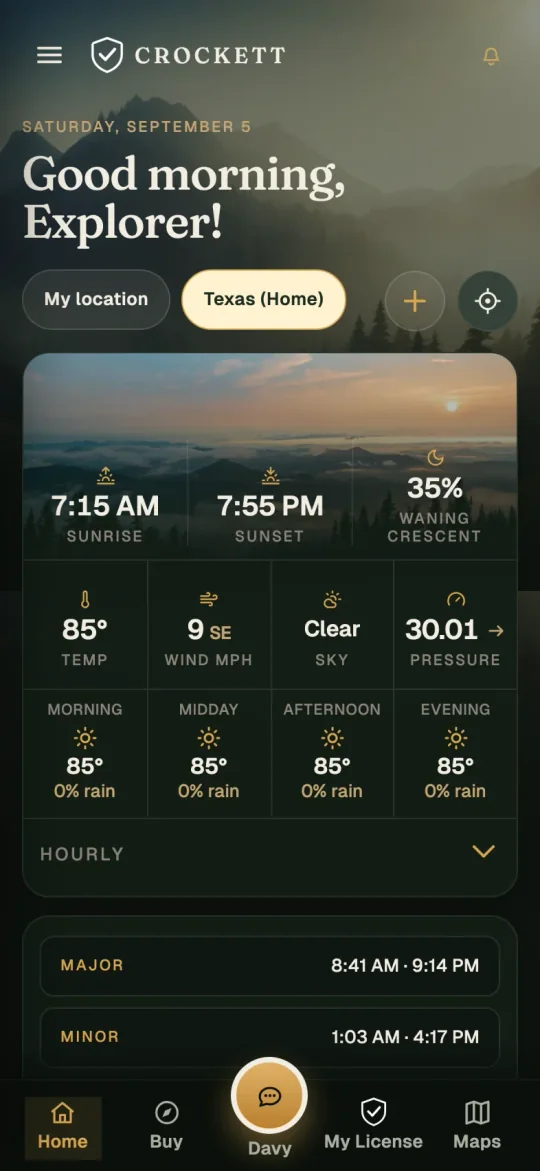
Crockett is coming to the App Store. For your product, start with what people need to do and why they will return. Explore our app development service.
What should go into the first brief?
Keep the initial brief short enough to discuss. A practical starting point is a page that covers the following decisions:
- Audience: who uses the product, and what do they already know?
- Core task: what should they be able to finish in the first release?
- Current process: how do they complete that task today?
- Context: where do they use it, on which devices, and with what connectivity?
- Existing systems: what information or integrations does the journey depend on?
- Success: what observable behavior would show that the product is useful?
Separate requirements from suggestions. “Customers need to see the status of a request” describes a need. A particular layout is one way to meet it. This distinction leaves room for design decisions while keeping the actual requirement clear.
Include the people who will operate the product after launch. A customer-facing screen can look complete while the business still has no agreed way to update its content or respond to its activity. That operational journey belongs in the discussion.
What changes the cost and ongoing work?
Format alone does not establish price. Compare the first release: pages or screens, workflows, user roles, content, integrations, testing, and handoff. Then separate the build cost from hosting, third-party services, maintenance, and future releases. If you are weighing a builder against a custom build, compare no-code and custom app development.
A web app with complex workflows can involve more work than a tightly scoped mobile app. A website with a substantial booking integration can involve more work than a simple informational site. Ask for the scope behind the estimate and a demonstration of the hardest requirement.
Confirm who controls the domain, hosting, source code, data, and relevant platform accounts. For a store-distributed app, agree account ownership and release responsibilities. For a browser product, agree who operates the backend and responds when a connected service fails.
Offline use, notifications, or device access should be tested on the intended platforms. Do not infer a capability from the label “app.” Describe what has to work, including what happens when the connection is unavailable.
Compare the website design scope with the app-development scope. If the existing website is the real problem, read the website redesign SEO checklist before commissioning a separate product.
How should you compare project quotes?
Compare the agreed work before comparing the totals. Check which user journeys, page types, integrations, testing, and handoff are included. Two proposals can use the same word, “app,” while describing very different first releases.
WTM Studio custom-quotes websites, apps, SEO, and AI SEO. App scope and timing are discussed for the individual product; the website timeline on our site is not an app-development estimate. Read how engagements are scoped before assuming one package covers every format.
WTM is based in Miramar, Florida and serves businesses nationwide. You can explore our Miami website design page for the studio’s local context. Wherever your business is based, the first conversation starts with the audience and the problem. Tell us what you want to make easier.
Choosing a website? Compare the scope.
Use the website quote comparison tool for a website project. For a web or mobile app, add the workflows, user roles, data and platform requirements before comparing proposals. The website worksheet is not an app cost estimate.